A YouTube Thumbnail Workflow From Idea to Testable Variants

Written by SRGE
We build thumbnail workflows for creators and publish practical guidance based on the product work and sources cited in each article.
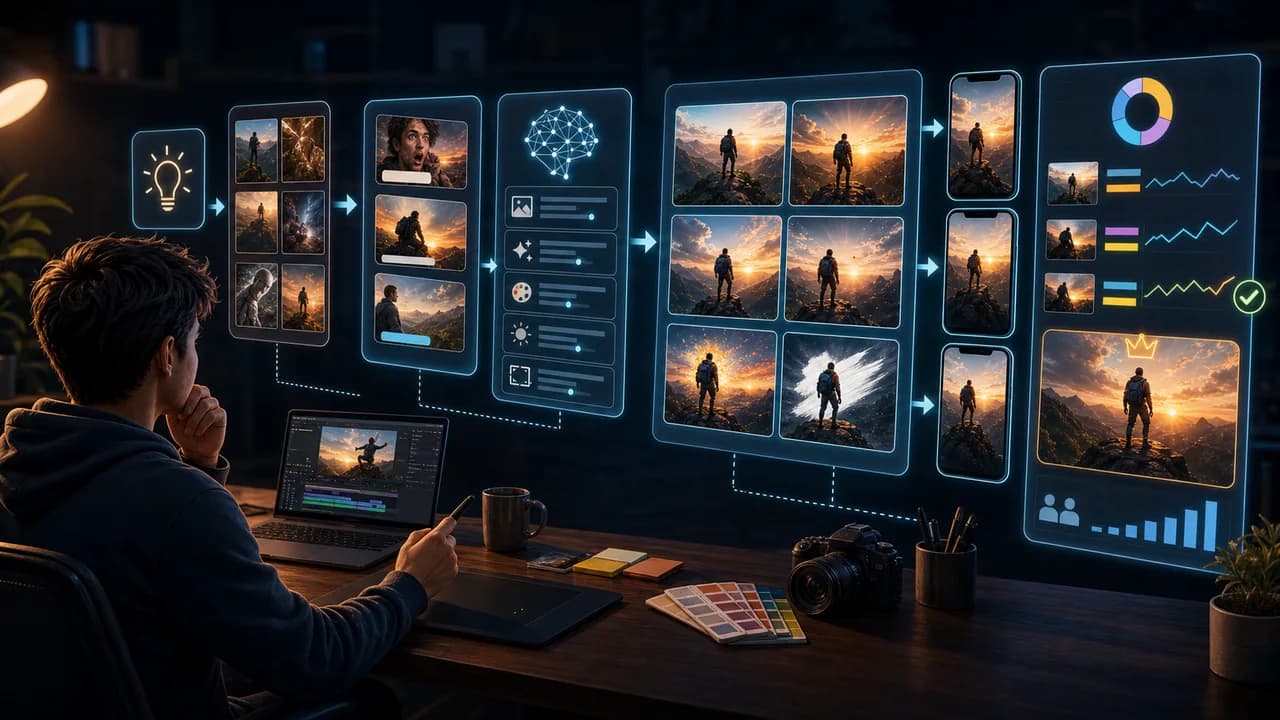
A good thumbnail workflow keeps you from polishing the wrong idea. The process should move from promise to concept to variant to final check, not from blank canvas straight to tiny design tweaks.
The useful goal is not to chase a universal thumbnail formula. It is to make the video's promise understandable at feed size, keep the packaging honest, and give yourself more than one strong direction to compare before publishing.
Fact-checked on 7 July 2026 against YouTube's thumbnail and title tips, custom thumbnail requirements, title and thumbnail testing documentation, and YouTube's spam, deceptive practices, and scams policy. The examples below are creative strategy guidance, not performance guarantees.
What people searching for YouTube thumbnail workflow really need
Searchers want a repeatable system. They are usually tired of guessing, copying competitors, or spending too long making one version they cannot objectively judge.
Principles that make the thumbnail easier to click
- Start before design: A thumbnail is easier to make when the video promise and title direction are clear.
- Explore promises, not decorations: Early variants should test result, problem, comparison, curiosity, or emotion—not just different colors.
- Use AI for breadth: AI is strongest when it helps you explore angles quickly, then you apply taste and honesty to choose.
- Finish with constraints: The final pass should check mobile readability, policy safety, title match, and actual video accuracy.
A practical workflow
- Define the viewer promise: Write the reason someone should click in plain language.
- Create five angles: Make result-led, problem-led, comparison-led, curiosity-led, and emotion-led directions.
- Generate rough concepts: Use short prompts that specify focal subject, composition, mood, and what to avoid.
- Choose and refine: Pick the clearest promise, then refine contrast, crop, background, and text separately.
Thumbnail angles and prompts to try
Use these as starting points in SRGE's idea workflow or the AI YouTube thumbnail generator. The best option should make sense before the title is read and still feel accurate after the viewer watches the video.
1. Result-led variant
Best when the outcome is visually impressive and honest.
2. Problem-led variant
Best when the viewer is trying to avoid a mistake or pain point.
3. Comparison-led variant
Best when the video compares tools, methods, prices, choices, or before-and-after states.
4. Curiosity-led variant
Best when the video has a reveal, discovery, or surprising mechanism.
5. Emotion-led variant
Best when the story depends on relief, regret, shock, pride, or disbelief.
Common mistakes to avoid
- Designing one thumbnail for hours before testing different promises.
- Generating AI images without a clear viewer question.
- Picking the most beautiful image instead of the most legible one.
- Skipping the final honesty check because the design looks polished.
Before you publish
YouTube's current guidance recommends thinking about the target audience, using familiar or emotionally clear features, keeping text easy to read, avoiding overly complex designs, and reviewing analytics after publishing. Eligible creators can also test up to three title, thumbnail, or title-and-thumbnail combinations in YouTube Studio; the winning option is selected by watch-time share, not CTR alone.
- Did you create variants with different promises, not just different colors?
- Does the final version survive a mobile-size preview?
- Does it match the title and the actual video?
- Can you explain why this concept beat the alternatives?
For the bigger picture, read how to make YouTube thumbnails that get clicks and, when you have multiple directions, our guide to A/B testing YouTube thumbnails.
If a concept is close but not clear enough, run the image through the YouTube thumbnail analyzer, then regenerate or refine it in the AI YouTube thumbnail generator.
Want the workflow without the blank-canvas pain? Use SRGE to go from one video idea to multiple thumbnail promises, prompts, and refinements in one place.
Keep reading