Thumbnail Mistakes That Make Videos Look Less Clickable

Written by SRGE
We build thumbnail workflows for creators and publish practical guidance based on the product work and sources cited in each article.
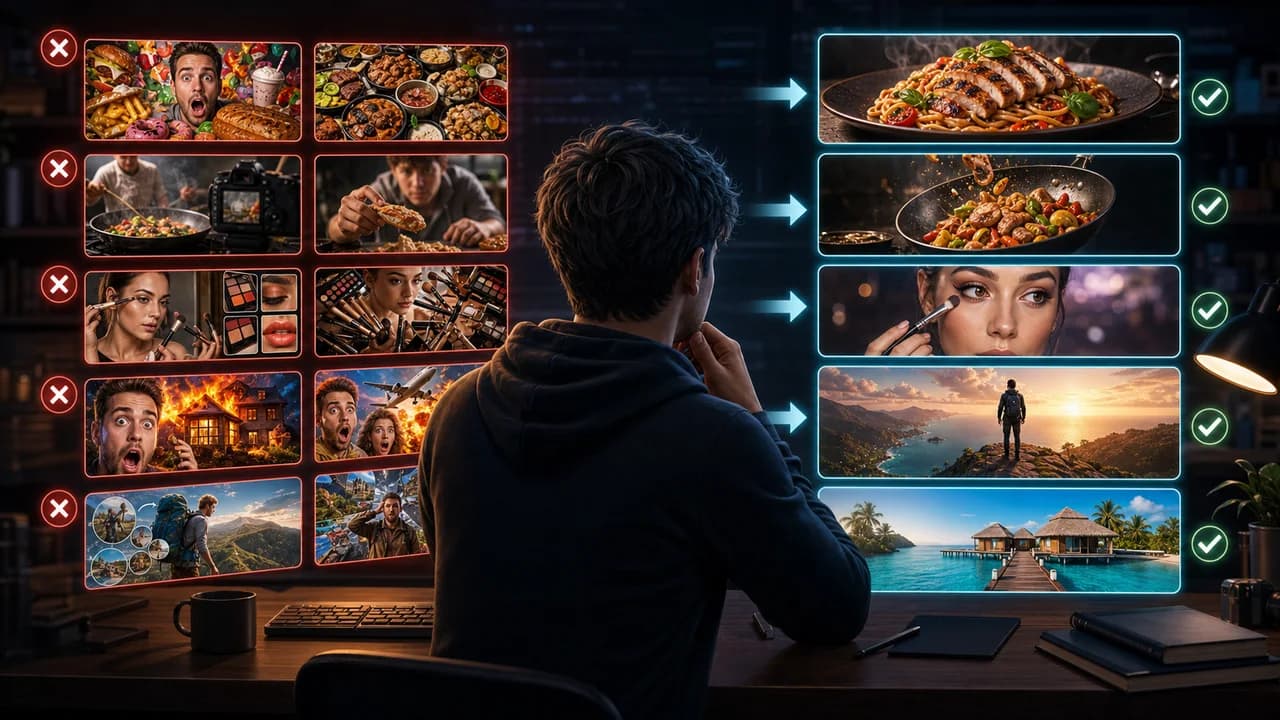
Most weak thumbnails are not weak because the creator has bad taste. They are weak because the viewer has to work too hard to understand what is being promised.
The useful goal is not to chase a universal thumbnail formula. It is to make the video's promise understandable at feed size, keep the packaging honest, and give yourself more than one strong direction to compare before publishing.
Fact-checked on 7 July 2026 against YouTube's thumbnail and title tips, custom thumbnail requirements, title and thumbnail testing documentation, and YouTube's spam, deceptive practices, and scams policy. The examples below are creative strategy guidance, not performance guarantees.
What people searching for YouTube thumbnail mistakes really need
Searchers want to know what to stop doing. The useful answer is not a list of design pet peeves; it is a list of choices that make the thumbnail harder to read, trust, or connect to the title.
Principles that make the thumbnail easier to click
- Clarity beats decoration: Glow, grain, arrows, particles, and depth blur cannot rescue an unclear promise.
- One focal point is usually enough: If the eye jumps between face, object, text, background, and UI, the thumbnail probably needs a hierarchy pass.
- Trust is part of packaging: A misleading image may earn a click, but it teaches viewers not to believe the next thumbnail.
- Generic AI polish is still generic: A beautiful image that could apply to any video is less useful than a specific, slightly imperfect image that fits this video.
A practical workflow
- Find the main promise: Write down what the thumbnail should make the viewer expect.
- Delete competing details: Remove every element that does not support that promise.
- Rewrite the title pairing: Make sure the thumbnail and title are not fighting for two different clicks.
- Make a cleaner alternate: The easiest way to spot mistakes is to compare against a simpler version.
Thumbnail angles and prompts to try
Use these as starting points in SRGE's idea workflow or the AI YouTube thumbnail generator. The best option should make sense before the title is read and still feel accurate after the viewer watches the video.
1. Fix clutter
Turn a busy layout into one large focal subject and one supporting detail.
2. Fix vague emotion
Replace generic shock with a specific feeling tied to the video: relief, regret, disbelief, or curiosity.
3. Fix weak proof
Show the result or consequence instead of decorating the topic.
4. Fix fake drama
Lower the exaggeration until the visual still creates curiosity but no longer overpromises.
5. Fix repeated text
Replace duplicate text with a visual that completes the title.
Common mistakes to avoid
- Adding more visual effects instead of clarifying the idea.
- Using a face that does not explain what the video is about.
- Letting AI invent fake product labels, screenshots, or outcomes.
- Making every object the same size and importance.
Before you publish
YouTube's current guidance recommends thinking about the target audience, using familiar or emotionally clear features, keeping text easy to read, avoiding overly complex designs, and reviewing analytics after publishing. Eligible creators can also test up to three title, thumbnail, or title-and-thumbnail combinations in YouTube Studio; the winning option is selected by watch-time share, not CTR alone.
- Is there one obvious focal subject?
- Can the viewer understand why this video is different from similar videos?
- Does the thumbnail avoid fake claims or misleading visual shortcuts?
- Have you compared it with a simpler version?
For the bigger picture, read how to make YouTube thumbnails that get clicks and, when you have multiple directions, our guide to A/B testing YouTube thumbnails.
If a concept is close but not clear enough, run the image through the YouTube thumbnail analyzer, then regenerate or refine it in the AI YouTube thumbnail generator.
Want to catch mistakes before upload? Use SRGE to create cleaner alternate thumbnails and compare which promise reads fastest.
Keep reading