YouTube Thumbnail Background Ideas That Keep the Hook Clear

Written by SRGE
We build thumbnail workflows for creators and publish practical guidance based on the product work and sources cited in each article.
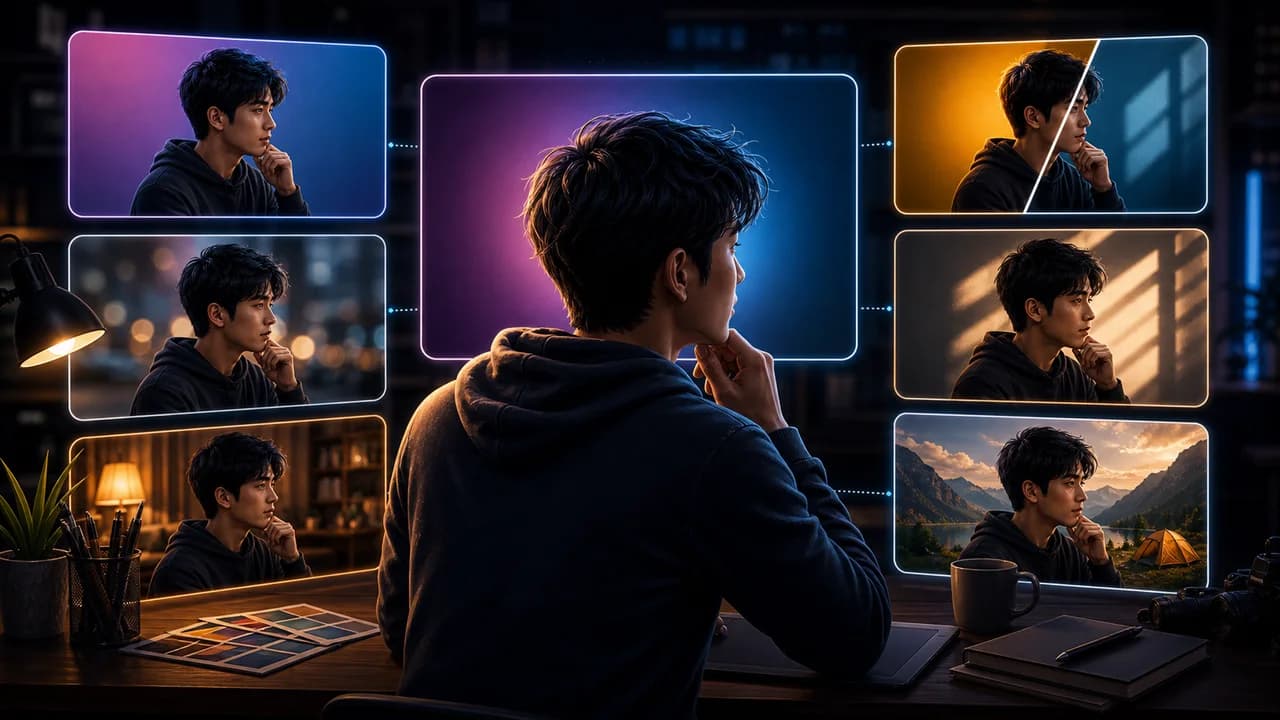
A thumbnail background should do one of three jobs: create contrast, add context, or set the mood. If it does all three loudly, it usually steals the click from the actual hook.
The useful goal is not to chase a universal thumbnail formula. It is to make the video's promise understandable at feed size, keep the packaging honest, and give yourself more than one strong direction to compare before publishing.
Fact-checked on 7 July 2026 against YouTube's thumbnail and title tips, custom thumbnail requirements, title and thumbnail testing documentation, and YouTube's spam, deceptive practices, and scams policy. The examples below are creative strategy guidance, not performance guarantees.
What people searching for YouTube thumbnail background ideas really need
People searching for background ideas often want something more interesting than a plain gradient. The best answer is to pick a background that supports the subject, not one that looks impressive by itself.
Principles that make the thumbnail easier to click
- Start with separation: The subject should separate from the background through brightness, color, depth, or shape.
- Use context sparingly: A kitchen, dashboard, game world, chart, or city can help, but it should not become the main puzzle.
- Keep texture low behind text: If you use thumbnail text, give it a calm area to sit on instead of placing it over detail.
- Match the video mood: A serious documentary, calm ASMR video, and loud challenge should not share the same background energy.
A practical workflow
- Choose background job: Decide whether the background is for contrast, context, or mood before generating it.
- Place the subject first: Design the background around where the main subject and any text will go.
- Blur or simplify detail: If the background is realistic, reduce detail behind the focal subject.
- Check the edge silhouette: The subject should still be readable if the background color changes slightly.
Thumbnail angles and prompts to try
Use these as starting points in SRGE's idea workflow or the AI YouTube thumbnail generator. The best option should make sense before the title is read and still feel accurate after the viewer watches the video.
1. Soft gradient
Use when the subject is strong and you only need clean contrast.
2. Context blur
Use when the setting matters but should not compete with the main object or face.
3. Light tunnel
Use directional light or shape to push attention toward the subject.
4. Clean split
Use a split background when the video compares two options or states.
5. Environmental clue
Use one recognizable cue from the topic instead of a full detailed scene.
Common mistakes to avoid
- Choosing a busy background because the subject feels too plain.
- Putting text over detailed texture with weak contrast.
- Using a background that implies a setting the video never shows.
- Letting background color and subject color blend together.
Before you publish
YouTube's current guidance recommends thinking about the target audience, using familiar or emotionally clear features, keeping text easy to read, avoiding overly complex designs, and reviewing analytics after publishing. Eligible creators can also test up to three title, thumbnail, or title-and-thumbnail combinations in YouTube Studio; the winning option is selected by watch-time share, not CTR alone.
- Does the background have one clear job?
- Does the subject silhouette separate at small size?
- Is the background honest to the video topic and mood?
- Can you simplify it further without losing the hook?
For the bigger picture, read how to make YouTube thumbnails that get clicks and, when you have multiple directions, our guide to A/B testing YouTube thumbnails.
If a concept is close but not clear enough, run the image through the YouTube thumbnail analyzer, then regenerate or refine it in the AI YouTube thumbnail generator.
Want cleaner backgrounds? Use SRGE to generate gradient, context, split, and mood-background variants around the same thumbnail subject.
Keep reading